Connect a website form to a CRM (WordPress, Wix and others): three ways and how to check that every request arrives
There are three ways to connect a website form to a CRM: the form's own integration, a webhook that posts each submission to an address the CRM listens on, or a middleman such as Zapier, Make or n8n. Take the built-in link if both products offer one, a webhook if your CRM can receive requests at an address, and a middleman when neither works. It is the same idea on WordPress, Wix or a hand-built site; only the place where the form settings live changes. Connecting is the easy half. The half people skip is proving that every request arrives, once, with its source, and that someone gets told.
Three ways to connect a form
| Way | How it works | Where it breaks |
|---|---|---|
| Built-in link | The form tool and the CRM have a ready connection; you log in to both and match the fields | A renamed field or an expired login, and requests stop without a word |
| Webhook | The form posts each submission to an address; the CRM or a bit of code receives it | The address changes or the receiver is down, and the submission may be gone |
| Middleman (Zapier, Make, n8n) | The form posts to the middleman, which creates the card and can do extra steps | One more tool to keep alive, and one more company holding your customers' details |
The built-in link
Look here first, because it costs the least. Open the form's settings and look for integrations, connect or webhook. Site builders and WordPress form plugins each do this their own way and rename menus often, so we won't write click paths; the help page of your form tool has them.
What decides whether it works is field mapping. A form with one "Full name" box feeding a CRM that wants first and last name may drop "Anna Kowalska" into one of them and leave the other empty. A single "Contact" field holding either a phone or an email gives the CRM nothing it can call. Fix that on the form first: one field per fact.
The weakness is silence. A login expires, or somebody renames a field while tidying the form, and the link can just stop, often with no error that anyone sees.
The webhook
A webhook is a plain idea. The moment someone presses Send, the form posts the data to an address you have given it, and whatever listens there turns it into a card. Zapier's own webhook trigger works like this: its help page describes "a unique URL that your trigger app can make POST requests to".
It is the cleanest route when the CRM can receive requests, because nothing sits in the middle. It also asks the most of you: you need to know which fields the form sends and what the receiving side expects.
Find out what your form does when the address doesn't answer: whether it tries again later or drops the submission. Switch the receiver off for a few minutes, send a test, switch it back on and see what turns up.
The middleman
Tools like Zapier, Make and n8n sit between two products that have no link of their own. The form posts to the middleman, which creates the card and can add steps on the way, such as a row in a sheet or a message to whoever is on duty. If your CRM has no address that accepts requests, this is usually how you get unstuck.
Three things to watch. The first is the test address versus the live one. n8n, for one, gives each webhook a test address and a production address, and a published workflow answers on the production one. Point the form at the test address and it may pass your test and still miss real submissions.
The second is billing. Find out how the tool counts its runs and what happens past the limit, because a stopped automation looks exactly like a quiet week.
The third is the extra company. Your customers' names and phone numbers now pass through another service, so say so in your privacy policy and ask your legal adviser whether anything else is needed.
How to check that every request arrives
Run these after you connect the form, and again whenever someone edits the form or the CRM. Use a name you will recognise, such as TEST Zebra, and a phone number you own.
| Check | What you do | A pass looks like |
|---|---|---|
| Arrival | Submit from your phone on mobile data, with a Ł or a Ż in the name | A card appears in a few minutes at most, letters intact |
| Fields | Read the card field by field | Name, phone and message each in their own field, nothing cut off |
| Source | Submit from every form and page that has one | The card says which form and page it came from |
| Duplicates | Submit twice with the same phone, once by double-clicking the button | One card, or two clearly linked to one person |
| Notification | Ask the person in charge to step away from the desk | They get a message about the new card without opening the CRM |
| Failure | Switch the receiving end off for a few minutes, submit, switch it on | You learn whether the request was lost or queued, and who would have noticed |
The source check is the one most often skipped. A card that says "website" is no use when you have a contact page, a landing page for ads and a form in the footer. Put a hidden field on each form holding its name, and have it copy the UTM tags from the address if your ads carry them. Then the card answers the question you will ask in a month: which of these brought the customer.
Duplicates come in two kinds. A double click is a technical fault and you want one card. A customer who writes on Monday and again on Thursday, because nobody answered, is information: the CRM should show one customer with two requests, because the second one tells you the first was dropped.
A card nobody reads is a lost email with extra steps. Name one owner per form and send the message somewhere they look without opening anything. After a week, compare the number of submissions the form recorded with the number of cards; the two should match. If the form keeps no list of its own, switch on an email copy of each submission for this purpose. The count fits next to the six numbers to check every Monday.
A shop order that becomes a card
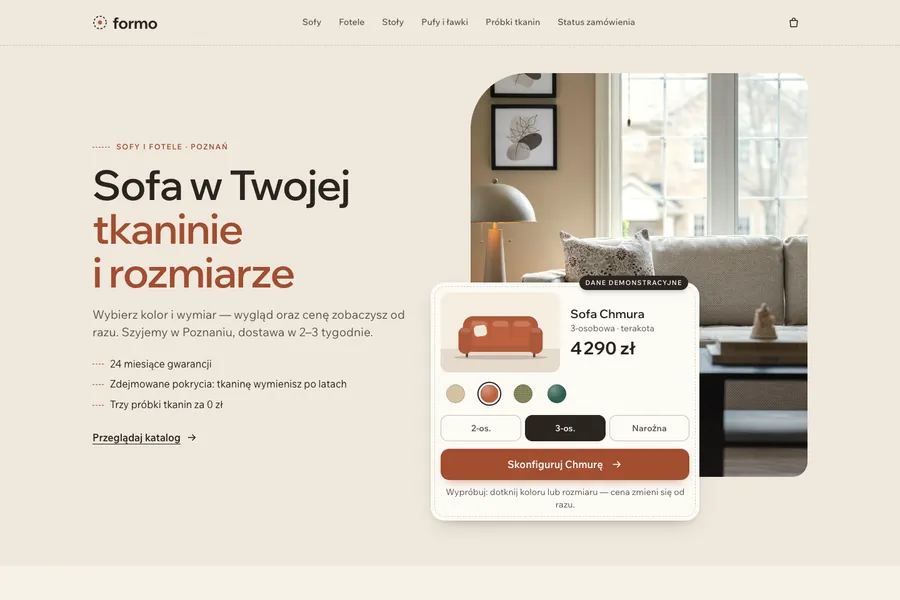
In a shop the form is the checkout, so the card has to carry the order, not just a name. Formo is one of our works: a furniture shop in Poznań, with the site in Polish. The buyer picks a fabric and a size, the price changes as they choose, then they enter an address and a delivery slot. The order reaches the owner's team chat and appears as a card in the CRM.
Fabric, size, address and slot all have to be on that card. If the choice made in the configurator is missing, somebody phones the buyer to ask again. So the first test on any shop form is to open the card and look for the thing the buyer chose.
If you keep your current CRM or spreadsheet
If your "CRM" is a spreadsheet today, the same logic applies, and our piece on Excel, Notion or Airtable as a CRM helps you decide when to move. If you are staying with a CRM you already pay for, we don't configure other developers' CRMs, but if all you need is for website requests to land in it, we'll pass them there. The checks above apply either way.
What to do today
- Fill in your own contact form from your phone as TEST Zebra and time how long the card takes to appear.
- Write down where each form sends a submission: email, CRM, sheet. Three places is common, and nobody remembers the third.
- Submit the same form twice and see what the CRM does.
- Check that each card says which form it came from; if it doesn't, add a hidden source field.
If you'd like us to do it for you
If you have no CRM yet, or yours is mostly a place where requests go to be forgotten, we build a Mini-CRM around your process. It starts from €480. Your website form is connected as part of the build: each submission appears as a card with the contact, the source, the conversation history, notes, an owner and the next task, and you and your managers get a WhatsApp message about every new request.
Also in the price: a call about how a request travels from the first message to payment; AI that replies to the customer about a new request and gives the manager a short summary, with a label so the customer knows it is AI; customers moved over from Excel or Google Sheets and checked with you before launch; message templates we write for your review; training for your managers; export to a spreadsheet at any time. There is no subscription and no fee per user, and the data and access are yours. Revisions are free until you accept the result, and bugs after launch are fixed free for 6 months. A Mini-CRM takes 2–4 weeks. Our experienced specialists work faster with AI tools, which is why the price is lower. Prices exclude VAT.
The details are on the page about our CRM with AI.
Sources
- Zapier Help: Trigger Zaps from webhooks, checked 4 November 2026.
- n8n docs: Webhook node, checked 4 November 2026.