Google Business Profile for a small business: how to set it up, verify it and keep it working
A Google Business Profile (formerly Google My Business) is free, and you can fill it in over an evening if your business has a place customers can visit or travels to customers. The order that saves time: real name, address or service area, one core category and your opening hours; then verification; then photos; then reviews, which you can only answer once the profile is verified. Google's guidelines ask for a phone number that reaches your location or a website for it, so a website is not a condition. The link you put in the profile is still where a visitor goes next, so it is worth tagging and pointing at one clear page.
Who can have a profile
The rule is short. If your business has a physical location that customers can visit, or travels to customers, you can create a profile. A hairdresser with two chairs, a photo studio with a rented space and a plumber with a van all fit.
Two details trip people up. The name is the one on your signage, entered exactly as it appears there. And the address has to be precise: Google asks for an accurate address, a service area, or both, depending on how you work.
Fill the profile in this order
| Field | What Google asks for | Slip to avoid |
|---|---|---|
| Name | Your real-world name, as on the sign | A name that differs from the one above your door |
| Address or area | A precise, accurate address and/or service area | A street without the entrance or floor customers need |
| Categories | As few as possible to describe your core business, from Google's list | Ticking everything you might do one day |
| Hours | Regular customer-facing hours, plus special hours for holidays and other temporary periods | Last year's Christmas hours still showing in March |
| Phone or website | A phone number that reaches this location, or a website that represents it | A head-office number that nobody at the location picks up |
Give the categories ten minutes. Pick the one that names what people type when they need you, and add a second only if you really sell a second thing every week. Special hours are a separate setting, so a bank holiday does not touch your regular week.
Verify it before anything else
Without verification you cannot reply to reviews. Google lists these ways:
- a code by phone call or text, which needs a number you can actually answer (an automated phone menu cannot take the code);
- an email with steps to follow, which needs access to the address shown on the verification screen;
- a live video call with a Google support representative, available only within the opening hours of your location;
- a video recording, which Google recommends when your business is eligible for it;
- a postcard with a five-digit code, sent to your business address.
The postcard is the slow one. Google says most codes arrive within 14 days and expire after 30. While you wait, don't edit the business name, address or category, and don't request a new code. Tell whoever opens the post at that address to expect it. After you complete the steps, Google says the verification review takes up to five working days, rarely longer.
Photos people will actually look at
Google asks for a logo, a cover photo and photos that highlight the features of the business. Photos are JPG or PNG, between 10 KB and 5 MB; 720 px by 720 px is recommended, 250 px by 250 px the minimum. Heavy filters and big alterations are out, and a photo that breaks the content policy is marked "Not approved" and does not appear on Search or Maps.
Take them yourself, on a phone, in daylight. The entrance goes first, because people are looking for the door. Then the place at work, then the thing you sell.
Reviews: answer them, ask for them honestly
Reply to every review, the short ones too. Once you are verified, you reply from the reviews screen of your profile. Google checks replies before they appear: up to 10 minutes usually, up to 30 days sometimes. The reply shows publicly under the review as coming from your business, not from your name.
Three rules we would pin above the desk:
- Thank the person for the one concrete thing they mentioned, not for "their feedback".
- On a bad review, say in one sentence what you will do and give a phone number. Don't argue the facts in public.
- If a review breaks Google's content policies, flag it instead of replying in anger.
Asking for reviews is allowed, if the ask is plain: real customers, a genuine experience, no strings. Google's policy rules out paid-for reviews, incentives such as payment, discounts or free goods and services, and selective asking, meaning only happy customers or discouraging negative reviews. Pressing people to review while they are still on the premises is out too. Google says fake engagement is removed. We don't buy, swap or invent reviews, and we won't help set that up.
Where the website link should go
People call this local SEO, and it starts with the same plain fields. The link is the one part of the profile that leads to something you own, and the easy option is the home page, which was designed for everyone at once.
A person coming from a map card usually has one question: can I come now, what does it cost, how do I get in. The page they land on should answer that on the first screen.
Tag the link, so you can tell these visits from the rest. Google's Analytics help says to always use utm_source, utm_medium and utm_campaign when you tag a URL: the first names whoever sends the traffic, the second the marketing medium, the third the campaign. For a profile link it could look like this:
yourdomain.com/?utm_source=google&utm_medium=business-profile&utm_campaign=website-link
The names are yours to choose; keep them identical everywhere you use the link.
Here is a page that answers the map-card question. It is the booking site for a photo studio in Kraków; the site itself is in Polish. A visitor sees three rooms, each card with its area, height, lighting and price per hour. A picker shows free hours for the next three days and counts the total as you tick them. The booking leaves as a ready-written message in WhatsApp or a team chat. Opening hours, address, phone, the house rules and a small route diagram from the stop to the gate sit further down.
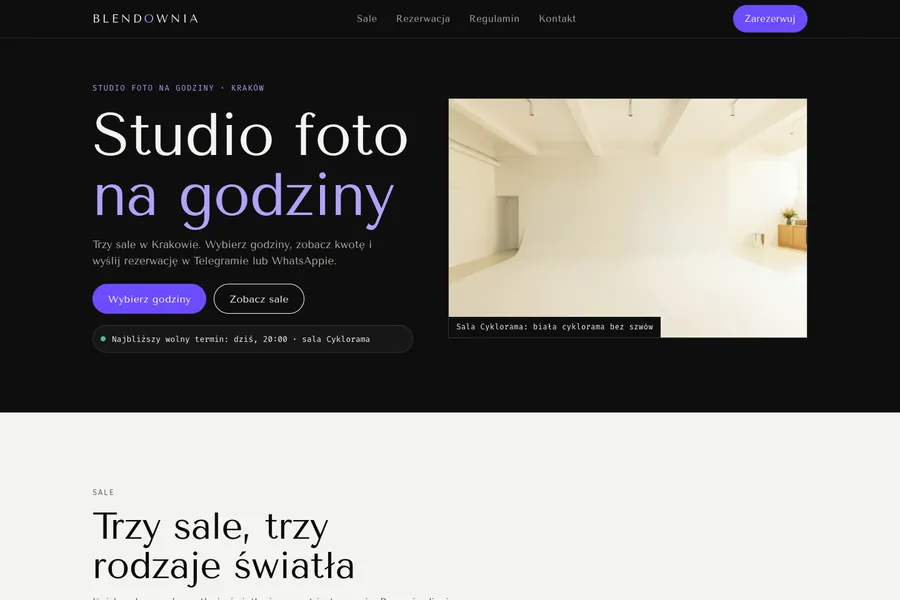
Do you need a website for the profile at all? Not to get one. A one-chair barber whose phone is always answered can stop reading here. A site earns its place when the visitor has to decide something, such as prices, free slots or which of three rooms, and a map card cannot hold that. If the profile should end in a booking, read our note on free booking systems for a small business.
What to do today
- Open your profile and compare the name and address with your sign and your door, letter by letter.
- Cut the categories down to the core, then enter regular hours and the special hours for the next holiday.
- Start verification, and tell whoever collects the post to watch for a card from Google.
- Take a handful of photos on your phone: the entrance, the place at work, what you sell.
- Tag the website link with the three UTM parameters and write the names down somewhere you will find them.
If you'd like, we'll do the page for you
We don't run Google profiles. What we build is the page the link points to: a landing page, from €380 (prices exclude VAT), live in 3–7 days. The price is low because experienced specialists work faster with AI tools. What the price covers:
- design around your brand, after a call about your offer;
- the copy written for you and sent for your review;
- a separate layout for phone and laptop;
- SEO basics: headlines and descriptions for search, fast loading, a sitemap and Google Search Console connected;
- a visit counter and your ad-account pixels, so you can see where people come from;
- a short form, with the request arriving on WhatsApp, by email, in a spreadsheet or in your CRM;
- publishing on your domain, with the code, domain and access in your name;
- free revisions until you accept, and free bug fixes for 3 months after launch.
Details and the add-ons are on the page for landing pages and company websites; what other EU studios charge is in Landing page cost in 2026. Message us on WhatsApp and we reply within an hour during working hours.
Sources
- Google Business Profile Help: verifying your business. Checked 30 October 2026.
- Google Business Profile Help: guidelines for your profile. Checked 30 October 2026.
- Google Business Profile Help: editing your profile. Checked 30 October 2026.
- Google Business Profile Help: photos and videos. Checked 30 October 2026.
- Google Business Profile Help: replying to reviews. Checked 30 October 2026.
- Google policy for content on Maps: fake engagement and incentives. Checked 30 October 2026.
- Google Analytics Help: campaign data with custom URLs. Checked 30 October 2026.