ChatGPT for a small business: seven jobs it does well, three things not to paste into it, and where it stops being enough
ChatGPT for a small business earns its place on seven chores: first drafts of replies, shortening long email threads, proposal skeletons, questions for suppliers, tone rewrites, meeting notes and checklists. Customers' personal data, passwords and other people's confidential files stay out of it. And a chat window stops being enough the moment an answer has to come from your price list, your calendar or your orders, because it knows none of them. Below: the seven jobs, three rules for a sticky note, and the point where an AI assistant for business connected to your own tools makes more sense than a browser tab.
Seven jobs where ChatGPT earns its place
Use it for the shape of a text, not for the facts in it. Anything where a confident wrong answer costs money (prices, legal deadlines, tax rates, what a product can do) you check yourself.
| Job | What goes in | What you check before it goes out |
|---|---|---|
| Reply to an unhappy customer | The situation in three lines, no names | Dates, refund terms, anything you actually promise |
| Shorten a long email thread | The thread, names swapped for roles | That the "agreed" part really was agreed |
| Proposal or quote skeleton | What you offer, in what order | Every number and every deadline |
| Questions for a supplier or contractor | What you are buying and what worries you | Which questions only you can answer |
| Tone rewrite or translation | Your own draft | Anything important goes past a native speaker |
| Meeting notes into tasks | Your scribbles | An owner and a date on every task |
| Checklist or step-by-step procedure | A rambling description of how you do it | Steps in the wrong order |
Take the unhappy customer. A parcel of candles arrived two days late, and the customer wants the shipping refunded, while your policy refunds shipping only after a five-day delay. You paste exactly that, without the name, and ask for a calm reply of five sentences. What comes back reads like a person wrote it. You then fix the one sentence that promises something you don't do. That fix is the real work.
The email thread is the quiet winner. A supplier chain with forty messages and three people in copy becomes two lists: what was agreed, what is still open. Scrolling through it takes a while; the two lists are quick to read.
For proposals, ask for the skeleton only: the problem, what you will do, the timeline, what you need from the client, how payment works. Then put your own numbers in. Left alone, it will write a deadline you can't meet and sound sure about it.
Three things that stay out of the chat
- Customers' personal data. Names, phone numbers, emails, delivery addresses, an order history tied to one person. Under GDPR, personal data is any information relating to an identified or identifiable natural person, and processing it needs a legal basis (Regulation (EU) 2016/679, Articles 4 and 6). Whether pasting it into a chat tool fits your basis is a question for your lawyer. The habit that costs nothing: swap "Anna Kowalska, +48…" for "customer A" and paste the situation.
- Passwords, card numbers, API keys and login links. Once typed into a chat, they live in its history, readable by anyone who can open the account.
- Documents that aren't yours to share: a client's contract, a competitor's price list someone forwarded to you, anything under an NDA.
Write these three on one page, add an example from your own business next to each, and send the page to everyone who can open the account. People can't follow rules they never saw.
Why a work account matters
A chat history on one employee's private login usually leaves with that employee, and the company can rarely see it or set anything on it. Open a company account, run the work through it, and read the data settings of the plan you are on: does it use your chats to improve the model, can you switch that off, who else in the company can see the history. Services differ here and the answers change over time, so read the provider's own page rather than a blog post, this one included.
Where a chat window stops being enough
People search for a "custom ChatGPT" hoping for a chat set up once with their tone and rules. That fixes the writing. It doesn't fix the plumbing: whatever it needs to know, somebody pastes in, and whatever it writes, somebody copies out. It doesn't know your price list until you paste it, it can't see whether Thursday at four is free, and there is no record of who asked it what. Three colleagues use it three ways, and you learn about a wrong answer when a customer complains.
| Situation | In a chat window | With AI connected to your tools |
|---|---|---|
| A customer writes on WhatsApp at 9 pm | You copy, paste and copy back, if you are awake | It answers from your documents; what it sends alone and what it only suggests is agreed in advance |
| Forty invoices arrive by email | You paste them one at a time | AI reads them into spreadsheet fields, and a person confirms each row |
| You ask what AI did last week | You scroll through chats | An action log shows what AI did and what you confirmed |
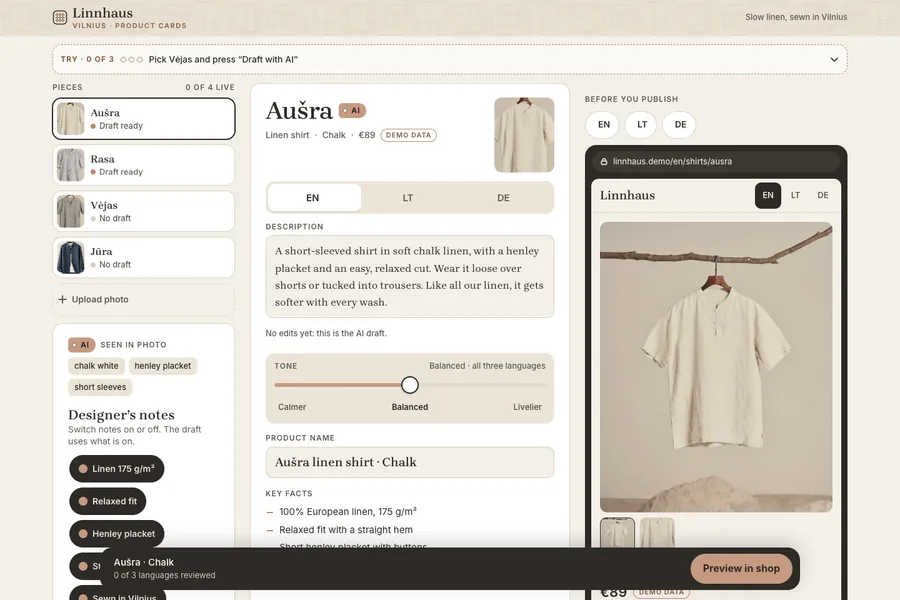
One of our demo works sits between the two. Linnhaus is a linen clothing brand from Vilnius, and the site is in English. You choose a photo and add a few notes about a shirt; AI prepares the product card in English, Lithuanian and German, with description, care and sizes. A tone slider moves the text between calmer and livelier. A person reads the draft, edits it, and only then publishes. In a chat you would do each of those steps by hand every time. Here the steps are the same for every piece. See the Linnhaus product-card work.
If what you want is replies to customers on WhatsApp, we wrote about what that can and can't do in WhatsApp chatbot for a small business. If the answer should land in a customer card, that is a CRM question: custom CRM for a small business.
What to do today
- Take the most annoying customer message from last week, strip the names, and ask ChatGPT for a draft reply. Edit it until you would send it. If that took less time than writing from scratch, you have found job one.
- Write down what never goes into the chat (the three rules above, with your own examples) and send it to everyone who has access.
- Open the data settings of the account you use and read what the plan does with your chats. If it is somebody's personal login, set up a company account.
- Keep the prompts that worked in a shared document: the exact wording, plus one good result next to each.
- For one week, tally every time someone copies the same kind of text into the chat and back out. That tally is the honest measure of whether you need more than a chat window.
If you want, we'll do it for you
Not every chore needs us. If a chat window covers yours, stay in it; at the free task review we say so before you pay. When the same text keeps travelling between your inbox, a spreadsheet and ChatGPT, that is the job for a small AI implementation: from €180, from 2 days, prices exclude VAT. Experienced specialists work faster with AI tools, which is why the price is lower.
You describe the task. In 15 minutes, free of charge, we look at what data you have, what result you need and where a person decides; within a day we name the timeline and the price in writing. You pay half upfront. In the price:
- a solution built around your task: a personal AI helper on WhatsApp, sorting of emails and invoices, prompts inside a spreadsheet or CRM;
- it works inside your systems (email, calendar, spreadsheets or WhatsApp) through their official interfaces;
- we choose the model, Claude or GPT, to fit the task and budget, and test it on your own examples before you accept;
- boundaries agreed in advance: what it does on its own and what it only suggests; you confirm money and replies to customers;
- an action log and a spending limit on requests to the model;
- a short guide and a call for you and your staff;
- accounts and access are yours; which AI service processes the data, and in which country, goes into the proposal before we start;
- free revisions until you accept, the second half of the payment after that, and bugs in the set-up and code fixed free of charge for 6 months.
Tell us what you already do in ChatGPT: the page for a small AI implementation built around your task has the form, and WhatsApp works too.
Sources
- Regulation (EU) 2016/679 (GDPR), EUR-Lex: Article 4(1), definition of personal data; Article 6(1), legal bases for processing. Checked October 2026.