Free CRM for a small business: what the free plans give you and the point where they stop being enough
A free CRM is a good idea for a small business, up to a point. If two or three people handle a few hundred customers and you mainly need one place for contacts and deals, HubSpot or Zoho will do the job and cost nothing. The limits show up when you want automation, more people, your own fields or a clean exit with your data. This article lists what the free plans include, where they run out, and when paying once for your own CRM makes more sense than renting a bigger plan.
What a free plan is for
Free plans are an entry door. The vendor hopes you grow into the paid tiers, and the limits are placed where growth usually hurts: users, records, automation and branding. That is a fair deal if you know it going in.
For a one-person business or a team of two, the free tier is often enough for the first year. You get a contact list, a deal board and a notes field, which already beats a spreadsheet with seven tabs. For a team of five with a real sales process, the free plan turns into a trial you never officially started.
What the free plans include
We opened the official pricing pages and copied what they say. Nothing here comes from reviews or hearsay.
| Service | Users | Records | Limits worth knowing |
|---|---|---|---|
| HubSpot Free CRM | 2 | 1,000 contacts, plus 1,000 records across other standard objects | 1 automated action in email automation (Starter allows up to 10) |
| Zoho CRM Free | 3 | The pricing page does not state a limit | 10 data exports, 10 custom email templates, 5,000 API calls per day |
Two details deserve a second look.
HubSpot gives you two users. The moment a third person needs to log a call, you are on a paid seat. Starter is $20 per seat per month at the normal price, and the page also shows a time-limited discount for new customers, so check the current figure yourself before you plan around it.
Zoho gives you three users and does not print a record limit on the pricing page. What it does limit is how often you can take your data out: ten exports on the free edition. That is a polite way of saying the data is yours, but not too often. The same page does not show a price for its paid CRM editions, only a per-user label, so for the cost of leaving the free plan you will need to check with the service.
Other vendors have free plans too, and the details change often. Whatever you pick, read the pricing page on the day you sign up, not a blog post from last year, including this one.
Where free stops being enough
In small companies the same five things tend to break first.
- The third user. An owner, a manager and an assistant is already three people. On HubSpot that is the end of the free plan.
- Automation. One automated action is enough to send a thank-you email. It is not enough to create a task, notify a manager and reply to a customer when a form arrives.
- Your own process. Your deals may have stages like "measurement booked" or "waiting for the customer's documents". Free plans give you a generic pipeline and the occasional custom field.
- Exports. If the number of times you can pull your data out is counted, you are renting the data, not owning it.
- Channels. Website forms usually connect without trouble. WhatsApp, Instagram and calls are where free tiers go quiet or point to a paid add-on.
Nothing here is a trick. It is simply the business model. If you hit two of these in the same month, the free plan has done its job and it is time to decide where to go next.
Three ways forward
Stay free and keep the process small. Works for solo owners and tiny teams. Set a rule that the CRM is the only place where a customer is recorded, and review it every Monday. If your data still lives in a spreadsheet, Excel, Notion or Airtable as a CRM covers when the switch makes sense.
Move to a paid plan of the same service. Sensible when your process is ordinary and the per-seat price is fine for the number of people you have. The monthly cost grows with every colleague and every feature, so work it out for your team of next year, not today. Best CRM for small business: what it really costs goes through that arithmetic.
Pay once for a CRM built around your process. Makes sense when you have several channels, a process that does not look like anyone's template, or a team that will keep growing. You pay one time, there is no per-user fee, and the data and access are yours. We cover the trade-offs in Custom CRM for a small business: when to build your own. If you are not sure whether your website form will reach any CRM at all, start with Connect a website form to a CRM and check it works.
What a custom CRM looks like in practice
Here is one of our demos: a CRM for an independent insurance broker in Hanover. The site is in German, and the numbers are demo data. Requests from the website, ads and WhatsApp land in a single inbox. AI summarises each request and drafts a reply in the customer's language, German or English. The broker edits it and sends it, because advice on policies stays with a person. A renewal calendar picks up contracts that end within 60 days and turns each one into a task with a letter template. A monthly report shows requests by source, contracts signed and commission.
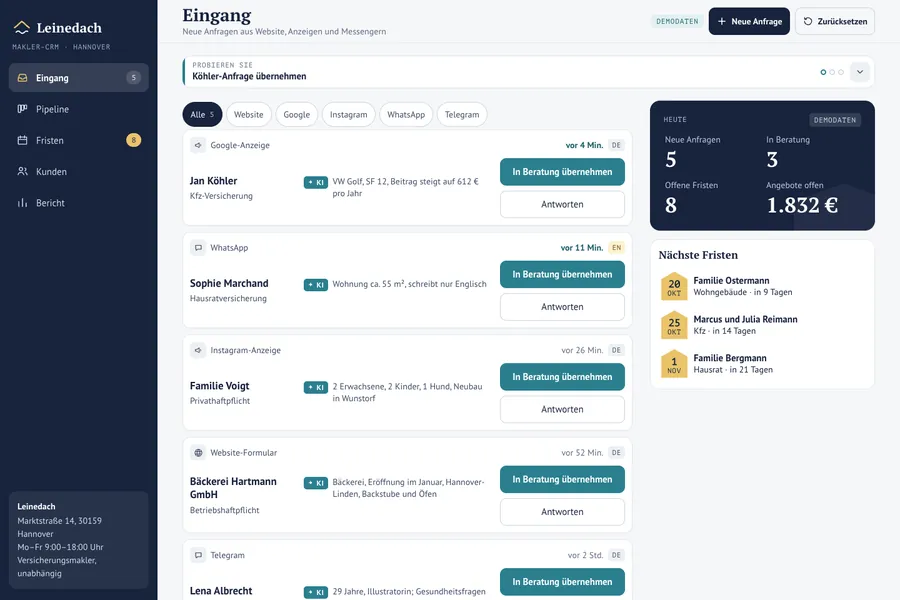
A free plan covers none of that, and not because the free plan is poor. A renewal calendar tied to contract end dates is a feature for a broker, not for everyone. That is the point where a generic tool starts to cost you time instead of saving it.
What to do today
- Count your users, contacts and channels, and write the three numbers down.
- Open the pricing page of the CRM you use, and find the line for the user limit and the line for automation.
- Check how you would export your data, and try it once with a test file.
- List the stages of your real process on a single sheet of paper and see how many your current pipeline lacks.
- Decide a date, such as the day you hire the third person, when you will revisit this choice.
If you want, we will do it for you
If the free plan has run out and you would rather not rent a bigger one, we build a Mini-CRM on our own engine for from €480. The price includes a call about your process, a pipeline built around your steps, your website and WhatsApp connected so each request appears as a card, a card with contact, source, history, notes, owner and next task, WhatsApp notifications and roles. It also includes AI that replies to a new request and summarises it for the manager (customers see a label saying it is AI), moving your customers over from Excel or Google Sheets, message templates we write for your review, and training for your managers. There is no subscription and no fee per user. You can export everything to a spreadsheet whenever you like, revisions until acceptance are free, and we fix bugs for 6 months after launch at no charge. Details are on the page about CRM with AI.
Sources
- HubSpot, CRM pricing, checked 9 November 2026: free for up to 2 users, 1,000 contacts, 1,000 records across other standard objects, one automated email action on the free plan.
- Zoho CRM, pricing, checked 9 November 2026: free for 3 users, 10 data exports, 10 custom email templates, 5,000 API calls per day.